
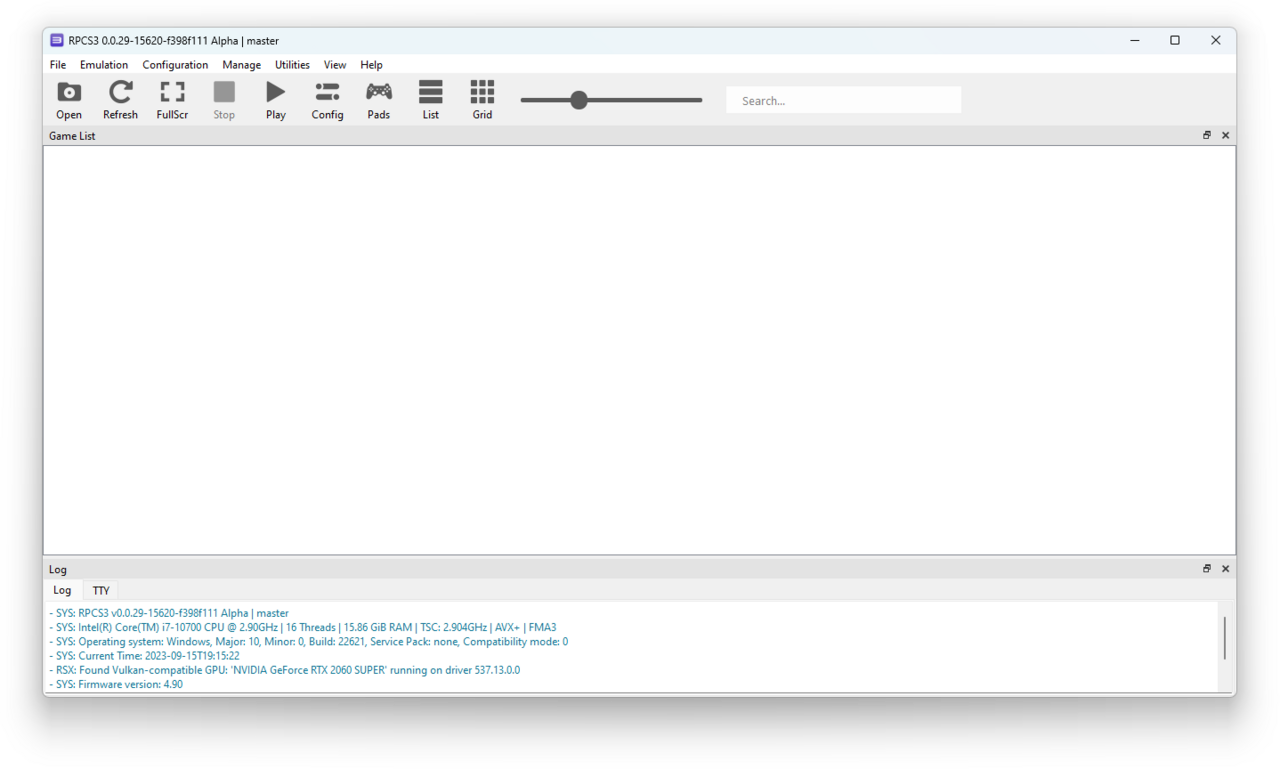
The RPCS3 emulator has recently introduced a feature that allows users to launch games directly from Blu-ray discs. This enhancement simplifies the gaming experience for users looking to play their favorite titles.
What is the RPCS3 Emulator?
The RPCS3 emulator is a powerful tool designed to emulate the PlayStation 3 gaming console on various platforms, including Windows, Linux, and macOS. This open-source project aims to provide a seamless gaming experience for players who wish to revisit their favorite PS3 titles on modern hardware.
One of the standout features of RPCS3 is its ability to run games directly from Blu-ray discs, a significant advancement in its functionality. This means users can enjoy titles without the need to create backups or install them on their devices, streamlining the gaming process.
Additionally, the emulator has made significant strides in compatibility and performance, allowing players to experience enhanced graphics and smoother gameplay compared to the original console. With an active community of developers and users, the RPCS3 emulator continues to evolve, ensuring that it remains a popular choice for gamers seeking to relive the PS3 era.
How Does Direct Launch Work?
The RPCS3 emulator has introduced a feature that allows users to directly launch games from Blu-ray discs, streamlining the gaming experience. This innovative capability eliminates the need for lengthy setup processes and enhances accessibility for gamers.
So, how does direct launch work? When a user inserts a Blu-ray disc into their system, the RPCS3 emulator automatically detects the game. The software then reads the disc data and loads the game directly, bypassing traditional installation procedures. This not only saves time but also reduces the risk of errors during the setup process.
Key features of direct launch include:
- Seamless Integration: The emulator integrates smoothly with the system’s file management, making it user-friendly.
- Enhanced Performance: Directly launching games can lead to improved loading times and performance stability.
- Broader Compatibility: This feature expands the range of supported titles for the RPCS3 emulator.
Overall, this advancement marks a significant leap forward for the RPCS3 community, making gaming more convenient and efficient.
Benefits of Using RPCS3
The RPCS3 emulator offers numerous advantages for gamers looking to enhance their experience. One of the most significant benefits is the ability to play games directly from Blu-ray discs, which simplifies the process and saves time. This feature eliminates the need for lengthy installation procedures and allows users to jump right into their favorite titles.
Additionally, the RPCS3 emulator provides improved graphics and performance enhancements compared to the original PlayStation 3 hardware. Users can expect smoother frame rates and higher resolutions, making classic games look better than ever.
Another advantage is the active community support. The developers continually update the emulator, ensuring compatibility with a growing library of games and addressing any bugs or issues that arise. This commitment to improvement means that gamers can enjoy a reliable and evolving platform.
Overall, the RPCS3 emulator stands out as a smart choice for anyone wanting to experience PlayStation 3 games in a more efficient and visually appealing way.
User Reactions to the Update
User reactions to the latest update of the RPCS3 emulator have been overwhelmingly positive. Gamers have expressed their excitement about the new feature that allows direct launching of games from Blu-ray discs, a long-awaited functionality for many users.
Many players took to social media platforms to share their thoughts:
- Convenience: Users appreciate the ease of access, stating that it saves time and enhances their gaming experience.
- Performance: Comments highlight improved performance and reduced loading times, making gameplay smoother.
- Compatibility: Several users have reported that various titles work seamlessly, showcasing the emulator’s capability to handle diverse game libraries.
However, some users have noted occasional issues with specific titles, prompting discussions on forums about troubleshooting tips and potential fixes. Overall, the community is thrilled with the advancements of the RPCS3 emulator, reaffirming its status as a leading choice for PlayStation 3 gaming enthusiasts.
Comparing RPCS3 to Other Emulators
When comparing the RPCS3 emulator to other gaming emulators, several key factors come into play. Many users appreciate how RPCS3 stands out in terms of compatibility and performance. While traditional emulators often struggle with frame rates and graphical fidelity, RPCS3 has made significant strides in optimizing these aspects, providing a smoother gaming experience.
Additionally, the ease of use with RPCS3 is often highlighted. Unlike some emulators that require extensive setup and configuration, RPCS3 offers a more user-friendly interface, allowing gamers to dive straight into their favorite titles.
Here are some points of comparison:
- Game Library: RPCS3 supports a wider range of PlayStation 3 titles compared to many competitors.
- Performance: Users report better frame rates with RPCS3, even on lower-end hardware.
- Community Support: The RPCS3 community is active, providing regular updates and troubleshooting assistance.
Overall, the RPCS3 emulator offers a compelling alternative for gamers seeking quality and convenience.
Installation Guide for RPCS3
Installing the RPCS3 emulator is a straightforward process that can enhance your gaming experience dramatically. Follow these steps to get started:
- Download the Emulator: Visit the official RPCS3 website and download the latest version compatible with your operating system.
- Extract Files: Once the download is complete, extract the files to a directory of your choice using software like WinRAR or 7-Zip.
- Install Dependencies: Ensure you have the required dependencies, such as the latest version of Visual C++ Redistributable and DirectX. These components are crucial for optimal performance.
- Configuration: Launch RPCS3 and configure your controller settings, graphics options, and other preferences based on your system specifications.
- Load Games: To utilize the new direct launch feature, insert your Blu-ray disc or load a game from your library.
With these simple steps, you can enjoy the benefits of the RPCS3 emulator and dive into your favorite titles effortlessly.
Future Features to Expect
As the RPCS3 emulator continues to evolve, there are several exciting features that users can expect in future updates. These enhancements aim to improve the overall gaming experience and broaden the emulator’s capabilities.
- Improved Performance: Developers are actively working on optimizing the emulator to enhance frame rates and reduce lag, especially on lower-end systems.
- Enhanced Compatibility: Future releases are anticipated to support an even broader range of PlayStation 3 titles, ensuring that more games run smoothly.
- User Interface Upgrades: Updates may include a more streamlined user interface, making it easier for users to navigate and access their games.
- Expanded Controller Support: The addition of more input options will allow gamers to utilize various controllers, further enhancing the experience.
- Online Play Features: There are discussions about integrating online multiplayer capabilities, enabling users to connect with friends and play together.
With these potential advancements, the RPCS3 emulator is set to redefine how gamers engage with classic titles.
Conclusion: Is RPCS3 Worth It?
In conclusion, the RPCS3 emulator presents a compelling option for gamers looking to enhance their PlayStation 3 experience. With its latest update enabling direct launch from Blu-ray discs, it simplifies the gaming process significantly. Users can now dive straight into their favorite titles without the cumbersome steps of navigating through menus.
The benefits of using RPCS3 are evident, especially for those who appreciate the convenience of modern gaming. The emulator not only supports a wide range of games but also offers improved graphical fidelity and performance compared to the original hardware.
Feedback from the gaming community has been overwhelmingly positive, praising the emulator for its reliability and user-friendly features. As RPCS3 continues to evolve, the anticipation for future updates adds to its appeal.
Ultimately, for gamers who want an efficient way to enjoy their PlayStation 3 library, the RPCS3 emulator is undoubtedly worth considering.
via Wikimedia Commons
Read the original
ISRO satellite launch: The Best Proven Success Story · OpenAI GPT-6 benchmarks: The Best Proven Performance Metrics




Leave a Reply